
GRANVILLE, Ohio—Denison University has been made aware of a financial scam targeting faculty, administrative staff, and support operating staff. If you receive a suspicious message, please forward it to isitsafe@denison.edu.

What is the message trying to steal?

The message attempts to steal sensitive personal information, including social security numbers.

What do I do if I get a malicious message?

  • Do not click links, call phone numbers, or reply to the message.
  • Do not give your personal information.
  • Report the message to Is It Safe by forwarding it to isitsafe@denison.edu.

How can I tell the message is malicious?

Denison’s ONLY partners for employee assistance are ComPsych (through the Employee Assistance Program, or EAP) and TIAA. You may receive legitimate communications from TIAA about your retirement accounts.

If you aren’t sure whether a message is malicious or not, forward it to isitsafe@denison.edu

Learn more about this contact campaign here.

We have observed an aggressive phishing campaign that has been targeting Denison over the past several weeks. This campaign has included multiple messages sent by different means, but all messages attempt to get a user to click on a link and input account credentials, such as usernames and passwords.

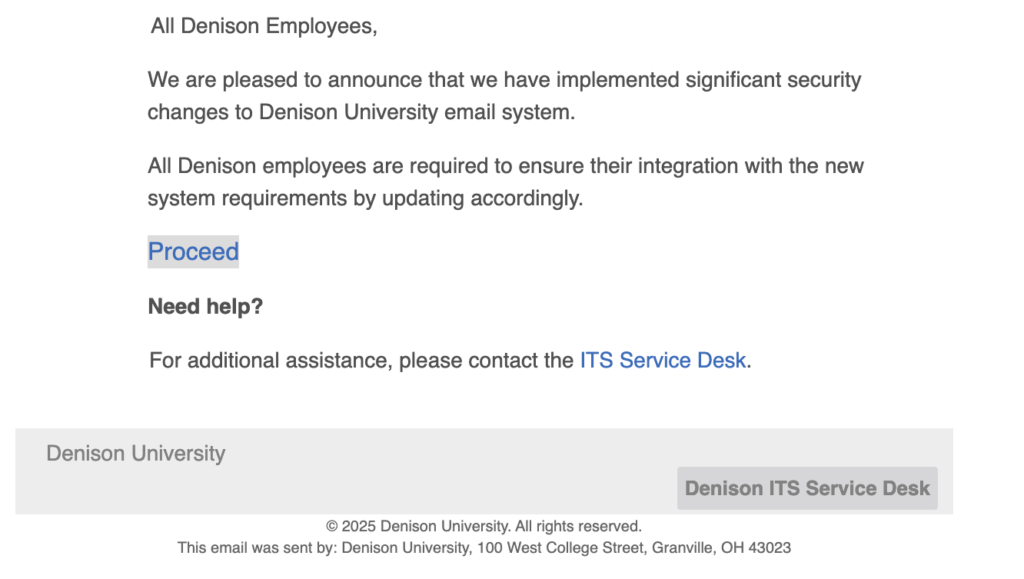
In this campaign, we have noticed impersonation of Denison accounts, including the Service Desk. This campaign includes a link or button that goes to a malicious webpage. We have observed the following domains.

  • vdgmentorias[.]com
  • du[.]vdgmentorias[.]com
A screenshot of the malicious phishing message.

Denison will never ask for your password by email, by Google Form, or by calling. If you receive such a message, please forward it to our reporting mailbox at isitsafe@denison.edu. If you have accidentally interacted with a message or think you might’ve sent credentials, immediately contact the Service Desk.
A tricky phishing attack is targeting Denison using Google Calendar invitations. Attackers are sending fake calendar invites, taking advantage of calendar invitation settings designed to make it easy to schedule meetings. 

This phishing technique sends a Google Calendar invitation directly to your calendar, which bypasses email spam filters. By default, Google automatically adds calendar invites directly to your calendar. The attackers’ invitations appear genuine alongside your real events, classes, and meetings.

What do I do if I get a suspicious Google Calendar invite?

  • Select “Report as spam” in Google Calendar to report the event.
  • Do not click “Accept” or “Decline.” This encourages the attacker to try again.
  • Do not click links, call phone numbers, or reply to a suspicious event. 

Learn more about how to detect and stop these attacks here.