Denison is aware of a data breach involving Instructure, the parent company of Canvas, our learning management system. This reported data breach is a nationwide event affecting multiple institutions.

Currently, Denison has not been notified of any direct impact to our campus. Canvas continues to be available for use by faculty, staff, and students.

Updates from Instructure are available on their status page. We will continue to monitor the situation and will provide updates if and when new information is available.

Over the past three months, 25 Denison accounts were taken over through phishing attacks that tricked people into approving a fraudulent Duo request. While these attacks have not yet led to data loss, this type of attack increases the risk that sensitive information and systems could be compromised.

Starting on Monday, March 23rd, a real-time security check will be added to the Duo login process to detect unusual login activity. If a login appears unusual, such as logging in from a new device and/or location, less-secure verification methods will not be available. 

What you’ll see

  • For the vast majority of logins, your login experience will remain unchanged. When using Duo Push, you’ll only need to enter a 3-digit code.
  • If an unusual login is detected, a high-security authentication method is required.
    • Less-secure Duo options, including phone calls and text messages, will be unavailable.
    • Duo Push will require a 6-digit code.
  • If you receive a Duo verification request that you did not initiate, deny it and change your Denison password immediately to protect your account.

What do you need to do?

  • If you already use Duo Push: You’re all set! No action is required.
  • If you primarily use Duo phone calls or text messages: Make sure you have a high-security authentication method set up so you can always log in to your Denison account. High-security authentication options include:
    • Duo Push
    • Built-in Device Authenticators such as Apple Touch ID, Face ID, or Windows Hello
    • YubiKey series 4/5 tokens

To learn more about Duo, visit my.denison.edu/duo

  • For a list of Duo authentication options, see: “Which Duo MFA authentication method is right for you?”
  • To add or update your Duo authentication methods, see: “How Do I Manage My Duo Devices?”

If you have any questions, please contact the Service Desk at (740) 587-6395 or servicedesk@denison.edu.

Update: 03/19/2026 12:15 pm
The DenAI service is back online. If you experience any issues, please report it to the ITS Service Desk at servicedesk@denison.edu or call 740-587-6395.

Original Post:
ITS is aware of an unexpected outage during an upgrade to DenAI and is working to resolve this issue. An update will be posted when available.

If you have any questions in the meantime, please reach out to servicedesk@denison.edu.

Update:
The maintenance has been completed. Please report any issues to the ITS Service Desk by email at service desk@denison.edu or call 740-587-6395.

Original Post:
ITS is performing maintenance on DenAI during the winter break. During this time, DenAI performance might be degraded or the service might be unavailable during certain times. If you experience issues, please try again after some time.

We appreciate your patience and understanding as we ensure the systems are up-to-date and secure. This post will be updated once the maintenance has been completed.

Zoom will be updated on Saturday morning, December 20, from 6:00 AM to 7:00 AM EST. This is a required update to ensure service continuity. This update does not change the Zoom experience.

While active Zoom meetings should not be impacted, you may not be able to log into the Zoom portal or the desktop app during this one-hour maintenance window. If you have any Zoom sessions scheduled during this time, logging in prior to 6:00 AM is recommended to avoid interruption.

Denison ITS is aware of multiple, ongoing phishing campaigns. These are very active campaigns, and they are attempting to steal account information in order to steal financial and student data.

This attack is targeting students, faculty, and staff. These campaigns contain a form (typically a Google Form) that requests personal information, including personal email addresses and/or Denison account passwords. The contents of messages vary, but they originate from similar sources. Recent phishing message subject lines include:

  • IMPORTANT NOTICE: Extra cash flexible gigs
  • General System Maintenance 12 / 15 / 2025— Act Fast!
  • Flexible, Part-Time Personal Assistant – $30/hour

As a reminder, NEVER send your password in an online form except for the Denison SSO page. You can verify the SSO page is real by looking in the address bar: the address should say identity[.]denison[.]edu. NEVER provide a multi-factor authentication (Duo) code that you didn’t initiate through SSO, especially over SMS or text message.

If you have any questions or suspect you may have provided information to the attackers, immediately contact the Service Desk.

Information Technology Services (ITS) will close for Winter Break at 12 PM on Tuesday, December 23, 2025, and reopen at 8 AM on Monday, January 5, 2026. During this break time, we will not monitor tickets, email or voicemail.

Please review the information below for guidance on technology support before and during Winter Break.

Before Winter Break 

During Winter Break

For Technology Outages or Major Issues

  1. Visit Netnotes to check for reported outages or issues. 
  2. If no information is available, please report the issue to the Denison University operator at 740-587-0810

Note: Please do not report outages or major issues directly to the ITS Service Desk during Winter Break.

For Individual Questions or Issues

Consult these self-service resources:

If you can’t find an answer and would like to submit a ticket with the Service Desk during Winter Break, you have three options:

  • Submit a ticket using the TOPdesk self-service portal.
  • Send an email to servicedesk@denison.edu.
  • Leave a voicemail with the Service Desk at 740-587-6395. 

As a reminder, tickets, email and voicemail will not be monitored during Winter Break. We’ll respond to your requests as soon as possible once Denison reopens.

Wishing you a wonderful and restful winter break!

GRANVILLE, Ohio—Denison University has been made aware of a financial scam targeting faculty, administrative staff, and support operating staff. If you receive a suspicious message, please forward it to isitsafe@denison.edu.

What is the message trying to steal?

The message attempts to steal sensitive personal information, including social security numbers.

What do I do if I get a malicious message?

  • Do not click links, call phone numbers, or reply to the message.
  • Do not give your personal information.
  • Report the message to Is It Safe by forwarding it to isitsafe@denison.edu.

How can I tell the message is malicious?

Denison’s ONLY partners for employee assistance are ComPsych (through the Employee Assistance Program, or EAP) and TIAA. You may receive legitimate communications from TIAA about your retirement accounts.

If you aren’t sure whether a message is malicious or not, forward it to isitsafe@denison.edu

Learn more about this contact campaign here.

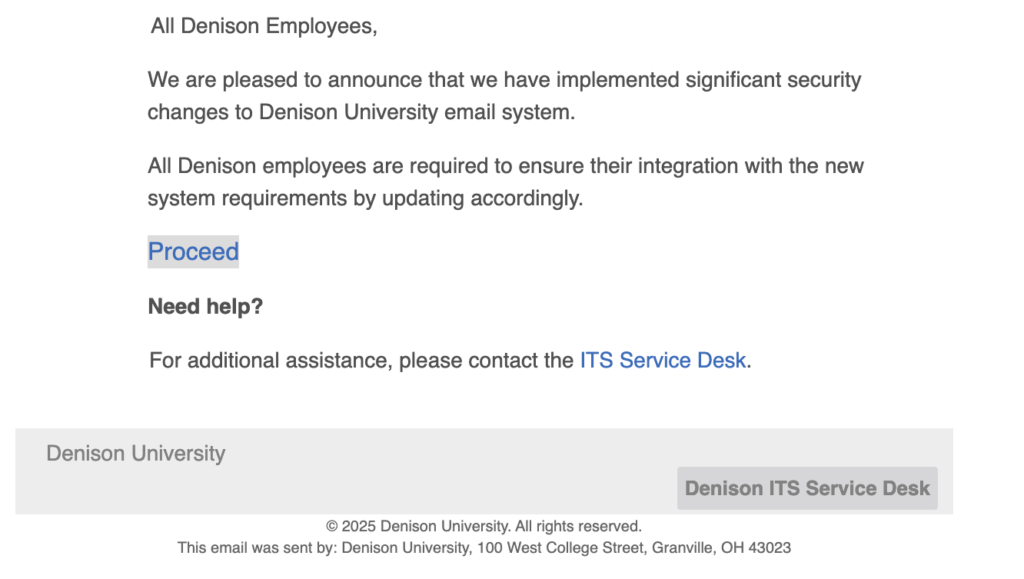
We have observed an aggressive phishing campaign that has been targeting Denison over the past several weeks. This campaign has included multiple messages sent by different means, but all messages attempt to get a user to click on a link and input account credentials, such as usernames and passwords.

In this campaign, we have noticed impersonation of Denison accounts, including the Service Desk. This campaign includes a link or button that goes to a malicious webpage. We have observed the following domains.

  • vdgmentorias[.]com
  • du[.]vdgmentorias[.]com
A screenshot of the malicious phishing message.

Denison will never ask for your password by email, by Google Form, or by calling. If you receive such a message, please forward it to our reporting mailbox at isitsafe@denison.edu. If you have accidentally interacted with a message or think you might’ve sent credentials, immediately contact the Service Desk.

A tricky phishing attack is targeting Denison using Google Calendar invitations. Attackers are sending fake calendar invites, taking advantage of calendar invitation settings designed to make it easy to schedule meetings. 

This phishing technique sends a Google Calendar invitation directly to your calendar, which bypasses email spam filters. By default, Google automatically adds calendar invites directly to your calendar. The attackers’ invitations appear genuine alongside your real events, classes, and meetings.

What do I do if I get a suspicious Google Calendar invite?

  • Select “Report as spam” in Google Calendar to report the event.
  • Do not click “Accept” or “Decline.” This encourages the attacker to try again.
  • Do not click links, call phone numbers, or reply to a suspicious event. 

Learn more about how to detect and stop these attacks here.